

Sentinel — Qwen3.8-27B UD-Q4_K_M (System One decision model)
Open, self-hosted System One decision model: send it structured questions
about a state and it returns calibrated probability distributions instead
of generated text. Wire-compatible with TypeSafe's Jev /v1/systemone.
Benchmark (JevBench public panel, 231 decisions):
| System | Accuracy | JevBench Score |
|---|---|---|
| Sentinel (this model, local) | 87.9% | 77.0 |
| Jev (TypeSafe, hosted) | 86.6% | 75.4 |
Calibration: ECE 0.049 on hard tier at T=1.2 (fitted, see usage). One decision
= one forward pass — output_tokens is always 0, nothing is ever sampled.
GitHub (server + agent skill + case study): https://github.com/clawdbot58-pixel/sentinel
What it is (and is not)
This GGUF is a decision engine, not a chat model. It is served behind a small FastAPI proxy that reads next-token logprobs over answer-option letters and returns probabilities. It never writes prose. Use it from code (routing, ranking, verification, game agents) — optionally with an LLM as the orchestrator that writes the questions.
| LLM | Sentinel | |
|---|---|---|
| Output | prose to parse | typed probabilities, schema-valid |
| Failure | hallucination | visible uncertainty (confidence/abstain) |
| Latency | seconds | 0.4–1.5s (one forward pass) |
Setup
Hardware used for validation: one AMD Radeon AI PRO R9700 (32GB, RDNA4), llama.cpp Vulkan (coopmat2) build. Any llama.cpp-supported GPU/CPU with ≥18GB unified memory works for Q4_K_M; the readout only needs logprobs.
1. Get llama.cpp
Any recent build works. For RDNA4 the repo used the coopmat2 GCN4 flags:
git clone https://github.com/ggml-org/llama.cpp
cmake -B build-vk -DGGML_VULKAN=ON -DGGML_VULKAN_COOPMAT2_GCN4=ON -DLLAMA_CURL=OFF
cmake --build build-vk --config Release -j
2. Start the backend
./build-vk/bin/llama-server -m Qwen3.8-27B-UD-Q4_K_M.gguf \
  --port 8912 -ngl 999 -c 8192 --jinja
8k context covers decision prompts up to ~3.5k tokens comfortably (p95 ~3s; ~1000 tok/s prefill on the R9700).
3. Run the Sentinel proxy (the /v1/systemone API)
git clone https://github.com/clawdbot58-pixel/sentinel
pip install fastapi uvicorn transformers
python sentinel/server/sentinel_server.py
# → POST /v1/systemone on http://127.0.0.1:8915
The proxy (see sentinel/server/sentinel_server.py in the GitHub repo) builds
the chat prompt, requests top-200 logprobs at the final position, and
temperature-normalizes (T=1.2 — this is the JevBench-fitted calibration; keep
it) over the option letters.
Usage
curl -s http://127.0.0.1:8915/v1/systemone \
  -H 'Content-Type: application/json' \
  -d '{
    "state": "Help! My payouts have been failing for 3 days.",
    "model": "sentinel",
    "questions": {
      "is_urgent": {"type": "noul", "instructions": "Does this convey urgency?"}
    }
  }'
{
  "model": "sentinel-0.1-qwen38-27b",
  "answers": {"is_urgent": {"type": "noul", "noul": 0.94,
    "probabilities": {"no": 0.06, "yes": 0.94},
    "confidence": 0.88, "abstain": false}},
  "usage": {"input_tokens": 131, "output_tokens": 0}
}
The three question types (Jev wire format):
| Type | Returns | Use |
|---|---|---|
choice |
choice + full probabilities over your options |
one-of-N selection, ranking |
noul |
noul = P(yes) |
conditions, gates, verification |
score |
probabilities over ordered levels 1..N |
graded rating, comparable ranking |
Responses add confidence (top1−top2 gap) and abstain (declines to commit
below a safety floor) — route on them.
Agent skill
The repo ships a skill (skill/SKILL.md) that teaches Claude Code, pi,
opencode, or any SKILL.md agent to use this API — the three primitives, the
response contract, patterns (route / select / gate / rerank / fan-out), and
operations. Install:
cp -r skill ~/.claude/skills/sentinel # or ~/.pi/agent/skills/sentinel
Case study: LLM + Sentinel beat Snake (fill the map)
An autonomous agent (muse-spark-1.3 via opencode), using only the skill, built a Snake agent where Sentinel makes 100% of the moves and filled the entire 36-cell board (263 decisions, untuned seed):
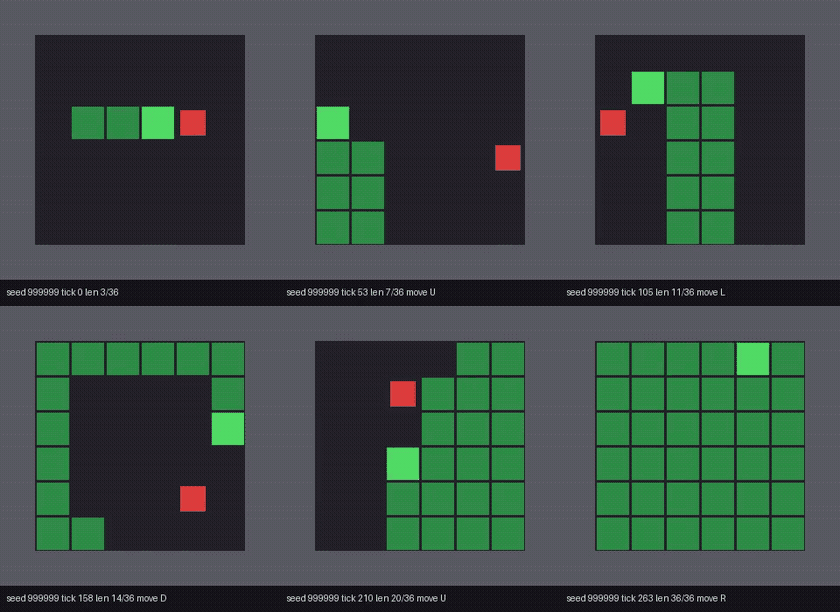
Pattern: code computes per-move facts (death flags, BFS distances, free
space, tail reachability), Sentinel ranks the moves each tick, an LLM wrote
the instruction and iterated on telemetry. Full writeup in the repo
(docs/case-study.md).
Notes
- Quantization: unsloth UD-Q4_K_M dynamic (imatrix-tuned). It beat Q5_K_XL, Q6_0_ROCMFPX and Q4_0_ROCMFP4 on the same benchmark — don't assume more bits help; the ladder was measured (see repo docs).
- License: MIT (model weights: Qwen3.8 series license via unsloth GGUF; skill adapted from typesafe-ai/skills, MIT).
- Trademarks: TypeSafe and Jev belong to TypeSafe AI; Sentinel is an independent, interoperable open implementation.
- Downloads last month
- 50
4-bit